


Ask. Get answers. Take action.
The VEVS AI Assistant connects AI directly with your car rental software, so it can work with your actual reservations, vehicles, customers, rates, payments, documents and operational settings. Instead of searching through screens and reports, simply ask what you need in everyday language.
Check today's pick-ups, find an overdue return, look up a customer, see which vehicles are available, explain a reservation price, create or update a booking, and handle everyday tasks faster. You stay in control and can review important changes before they are applied.
Talk to Us Read more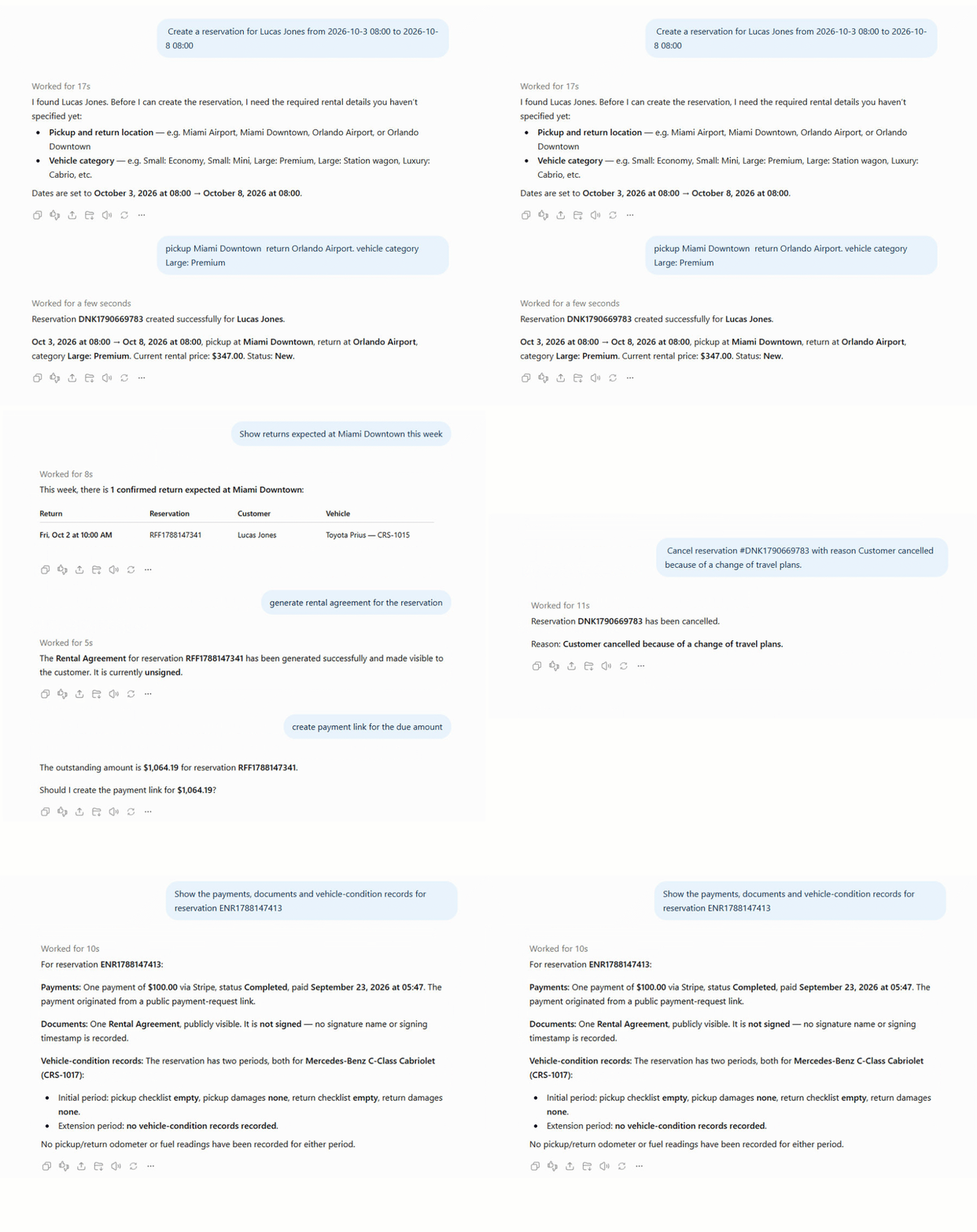
What the AI Assistant can do
From reservations and fleet availability to payments, documents and maintenance, the AI Assistant helps your team complete everyday work faster with fewer clicks.
Reservations & Bookings
Create, find, update and follow up bookings from a natural-language request.
- Find reservations for a customer
- Show bookings from a date range
- Create a booking from pick-up to drop-off
- Apply a promo code or discount
- Confirm, cancel or mark a no-show
- Extend a reservation or replace a vehicle
Fleet & Availability
See what is on the road, what is free and what is blocked.
- Which vehicles are available for these dates
- Show vehicles in a category or branch
- Move a vehicle to another location
- Block a vehicle for a period
- Update status and mileage
- Spot availability conflicts
Customers & Drivers
Work with the people who rent from you and everyone attached to a booking.
- Find a customer by name, email or phone
- Create or update a customer
- Show all bookings for a customer
- Add an extra driver to a booking
- List the drivers on a reservation
Pricing, Rates & Extras
Explain and adjust the prices behind every quote.
- Show or set base, weekday and weekend rates
- Create seasons and rental periods
- Manage promo codes and usage
- Update extras and add-ons
- Review mileage, fuel and location fees
- Check taxes and protection plans
Payments & Deposits
Keep track of what is paid, what is due and how customers can pay.
- Show payment methods and providers
- Review booking payment options
- Check a reservation balance
- Manage security deposits
- Track deposits, fees and pay-later rules
Documents & Agreements
Generate and check the paperwork that goes with a rental.
- Generate a rental agreement
- Create an extension agreement
- Produce a return inspection sheet
- Check whether a document is signed
- Send an agreement to a customer
Maintenance & Reminders
Keep vehicles serviceable and tasks on schedule.
- Show overdue maintenance tasks
- Create a task by date or mileage
- Record task cost and downtime
- Set reminders for staff
- Review vehicle service history
Locations, Branches & Hours
Answer the operational detail that slows down a phone call.
- Show opening hours for a location
- Check if a location is open now
- Set out-of-hours pick-up fees
- Review vehicles and bookings per branch
Agents & Partners
Understand the referral and commission side of the business.
- List agents and their details
- Show bookings by agent
- Review commission due
- Rank top agents by bookings or revenue
Use VEVS Directly from ChatGPT
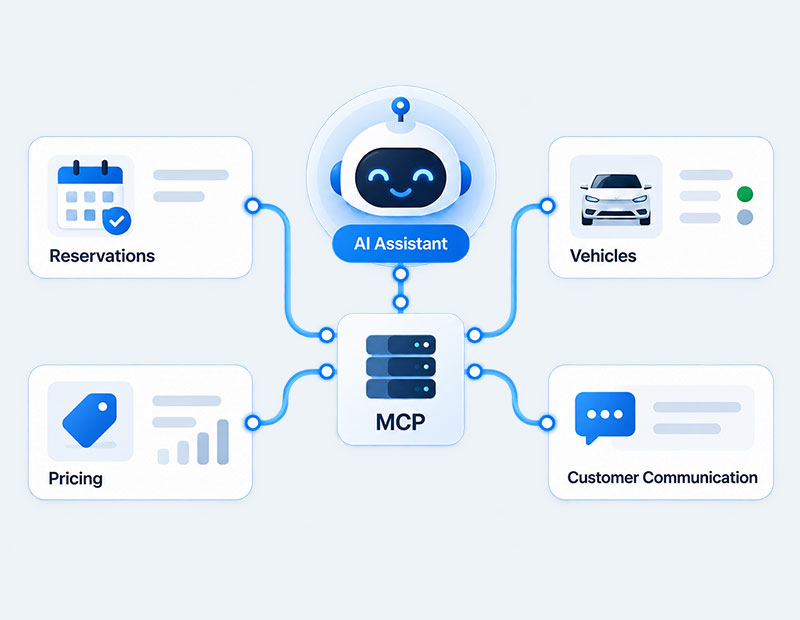
Connect your VEVS account with ChatGPT and work with your car rental business directly from the ChatGPT app. Ask questions, check live information and perform supported actions without constantly switching between systems. Behind the connection, VEVS uses MCP (Model Context Protocol), which also makes the AI Assistant available to other AI platforms that support MCP servers.
Start immediately with requests such as today's pick-ups, today's returns, available vehicles today, block a vehicle and extend a reservation.
How it works
Three steps from a question to a result.
Connect
Connect your VEVS account with ChatGPT or another AI platform that supports MCP servers.
Ask
Tell the AI what you need in normal language, just as you would ask a member of your team.
Review & act
Get an answer from your live data or review a proposed action and confirm the change when needed.
Things you can ask today
A quick sample of the questions the assistant handles.
AI that works with your real business
The VEVS AI Assistant is designed for real daily operations, with controlled access, live business data and safeguards for important changes.
Controlled access
The assistant uses authenticated access and only works with the information and actions available to the connected account.
You stay in control
Important, destructive or unclear changes can be shown for confirmation before anything is created, updated or cancelled.
Clear business answers
Get useful answers with names, dates, currencies and familiar business information instead of technical IDs and system data.
Live VEVS data
The assistant works with your current car rental data, helping your team make decisions based on what is happening in the business now.
Frequently asked questions
Browse the answers below, or read the full VEVS AI Assistant knowledge base article for more information.
See how much faster your rental business runs with AI
Book a demo and see how VEVS can connect with ChatGPT to answer questions, work with live rental data and help your team handle everyday tasks faster.